Garmin Zümo 396 won't connect to computer
Wed Feb 04, 2026 11:14 am
Hello,
searches show that this is a recurring problem, but unfortunately no solution has been found.
I have reset the device, deleted data, restored factory settings.
I unscrewed and looked at the motherboard. Everything seems fine.
I have tried connecting the device to different operating systems
(Windows, Linux), including different USB ports and cables.
The USB port, the cable charges the battery.
Also different MPT Settings
(MTP Auto Detect, Mass Storage, Mass Storage Single Session)
Nothing helps. When connecting, it gives a message that
USB connection detected
Entering file transfer mode
and that's it. Shows icon look like device connectet to the computer
Is there nothing else to do but consider the device doomed
Device is:
Garmin Zumo 396
C2p2 T V6 16GB 128MB DN TE
UT
searches show that this is a recurring problem, but unfortunately no solution has been found.
I have reset the device, deleted data, restored factory settings.
I unscrewed and looked at the motherboard. Everything seems fine.
I have tried connecting the device to different operating systems
(Windows, Linux), including different USB ports and cables.
The USB port, the cable charges the battery.
Also different MPT Settings
(MTP Auto Detect, Mass Storage, Mass Storage Single Session)
Nothing helps. When connecting, it gives a message that
USB connection detected
Entering file transfer mode
and that's it. Shows icon look like device connectet to the computer
Is there nothing else to do but consider the device doomed
Device is:
Garmin Zumo 396
C2p2 T V6 16GB 128MB DN TE
UT
Re: Garmin Zümo 396 won't connect to computer
Sun Feb 08, 2026 10:52 am
I had this issue on a different model & found it was the cable that was no good. The cable worked on a work colleague's Garmin, but not mine. I tried a newer cable & it worked again. I can only guess there was resistance in the first cable that gave the problem. OTG (on the go) cables only ever go into SatNav mode, not mass storage & that is something to do with a resister on one of the pins in one end of the plugs. I would try a range of cables in the rear ports (higher wattage or something than front) until I found one that worked. I would NOT give up.
Re: Garmin Zümo 396 won't connect to computer
Tue Feb 10, 2026 6:36 am
With different cables, only picture what I can see on Garmin.
No connection or device on computer.
(picture is not my device, but screen is same)
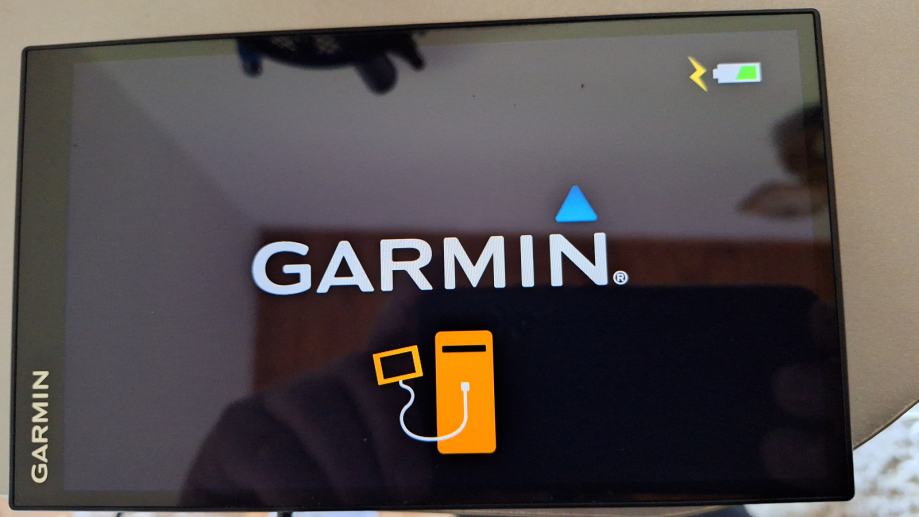
No connection or device on computer.
(picture is not my device, but screen is same)